
StarOverIP
All solutions over IP
Internet, Data, Voice, Video, Services and Consultancy
Ways to Connect to the Internet
IPv4 Address Registration, AS and Internet RouteLookup Tool
Ways to Connect to the Internet
There are numerous ways to connect your organisation to the internet. These vary depending on the size of the organisation and when your requirements are from this connection. There is also normally a split based on function too. With the move away from running services within your office building to running them in professional data centres or the cloud the internet connection requirements do change. In the early years companies would have a router connected to the internet with a simple Network Address Translation (NAT) rule out to allow everyone to share this internet access with no controls. There would also be an inbound NAT to their mail/web server sitting in their communications room. We have moved a long way since the 1990s. Now it is more likely that the office locations would have outbound only connection(s) to the internet with the traffic passing through a firewall and/or a proxy server to control where the traffic would go. Or the step beyond that putting these controls into the cloud so the user experience is the same in the office and remote with secured connections to their cloud applications.
Single Homed No Public Address Space Outbound Only
 |
This is where you have a single connection to the internet from an Internet Service Providers (ISP) is the most basic connection. If you are not providing any services to the internet then your setup will be similar to a home installation, that is outbound to the internet only. Your router or firewall will connect to your ISP’s Customer Premises Equipment (CPE). With no allocated public Internet Protocol (IP) space, the only public IP address will be the link to your ISP, which they will provide. This means that you will have to Network Address Translation (NAT) or Port Address Translation (PAT) on the router that connects to the internet. This will allow outbound and inbound traffic to be translated from the public IP address to internal private IP addresses. The route will be the only device to have a public IP address assigned to it either manually or by Dynamic Host Configuration Protocol (DHCP) and either a static default route (0.0.0.0 0.0.0.0) or a default gateway by the ISP. This device will have to NAT all the inside IP addresses to the ISP's public address on the outside. |
Single Homed Public Address Space Inbound Only
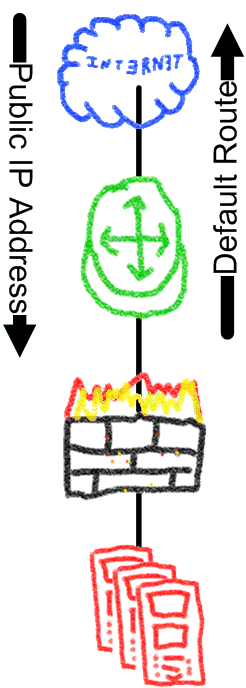 |
If you do have an allocation of public IP addresses. either a small block from your ISP or a direct allocation to your organisation of a class C network or more. You will also have a public IP address for the link net to your ISP, now the NAT or PAT does not have to be done on the router connected to the ISP. The route will still have a static default route pointing out of its internet interface to the ISP. It will also have a NULL route the whole of the public IP address allocated to the organisation and static, normally host routes i.e. routes to a single host pointing to the network or security devices that are allowing traffic out to the internet. This is normally via the IP address of internal device connected to the internet router. The internet router will now only have internal routes to the devices that are going to use the public IP addresses. These might be a firewall or proxy server or a load balancer or a server that requires access to the internet. The purpose of the NULL route is for traffic destined for public IP addresses that are not in use to be forwarded in hardware to nowhere. The public address will need to be advertised out to the internet, in a single provider setup like this it is common for the ISP to statically advertise your allocated IP network on its Customer Edge router (CE). This makes the configuration for the customer very straight forward and means they do not need to configure Border Gateway Protocol (BGP). |
Multi Homed Public Address Space Inbound Only
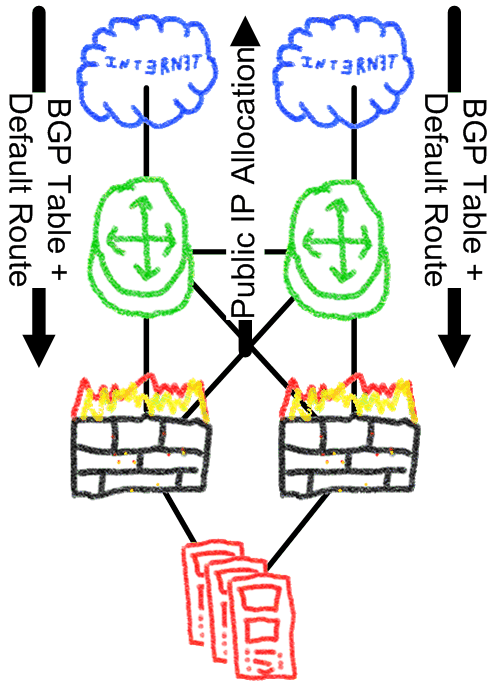 |
This is a step up in complexity as you need to have a public IP address allocation that can be routed to more than one ISP and ideally your own Autonomous System (AS) number. The AS number is straight forward you just need to organisations that have AS number to sponsor your application through your Regional Internet Registry (RIR). The public IP address allocation would have to be a Class C (/24, 256 addresses) network or bigger. You will have to confirm with you RIR about getting such an allocation. Each ISP will allocate a public IP address for the link nets to connect to that ISP. These IP addresses will need to be configured on the upstream interface of each router and the BGP peering to each ISP will be sourced on the link nets, this peer will need to have next-hop-self configured so the BGP process with replace the BGP next hop of the routes to the IP address of the link nets. This is so the ISP uses its connected network as the next hop. For the BGP your AS number is configured on both of your routers and network statement for your public IP address allocation with a corresponding static route to NULL for that network on each device. This ensures the full allocation is advertised to the internet and all traffic will be forwarded to you. Additionally, all routers in the same AS must be peered to each other to maintain the continuity within the AS. This could be done on the link nets between the routers or preferably via loopback addresses. This again adds another layer because you need a method to reach the loopbacks i.e. an Interior Gateway Protocol (IGP) for example Intermediate System to Intermediate System (IS-IS), Open Shortest Path First (OSPF) or Enhanced Interior Gateway Routing Protocol (EIGRP). These IP addresses should be non-public IP addresses so they cannot be reached from the internet. The ISPs should send you the default route and a full internet routing table. From this you should setup filters on the inbound routes to allow your routers to learn the default route and all routes that are up to twa AS’s away i.e. all the ISP’s routes, it’s customers routes and it’s Internet Exchange (IX) routes. These should be all the routes directly connected to the ISP any other routes you will get to via the default route and will be shared across both ISPs. Your public IP addresses should be statically routed from the external routers to where the traffic needs to go ideally using host routes. No public IP address should the routed if it is not being used so the external routers can drop any unwanted traffic. |